Best Tech Support in the USA

657 775 0486

Remote Unlocker

EONEBOSS Tools is a specialized line of hardware designed to bypass expensive, traditional aftermarket software setups. It allows automotive locksmiths to securely unlock, emulate, and reuse locked original equipment manufacturer (OEM) smart keys.
 
Technical Description for Locksmiths
The EONEBOSS ecosystem targets the modern anti-theft frameworks of Toyota, Lexus, and Subaru smart key networks. Rather than executing an intrusive, bench-top EEPROM chip desoldering process or using high-fee external software licenses, the hardware facilitates data emulation directly over secure transponder fields.
 
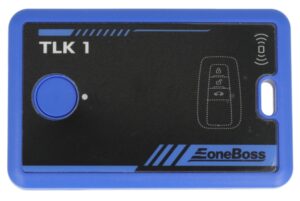
  • EONEBOSS TLK1: Dedicated to the recovery of 8A chip architectures. It is fully compatible with 8A-AA, BA, B9, and B8 transponder variants. It functions primarily as a secure identifier simulator.
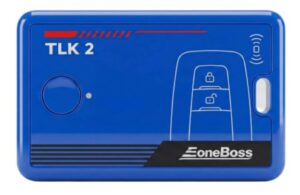
  • EONEBOSS TLK2: Designed specifically to handle 4A chip architectures (including 4A-AA and BA transponder structures).
  • EONEBOSS TLK3: An advanced data collection tool featuring an integrated signal sniff module. It captures raw RF frequency, frequency sequences, and data packets directly from the vehicle’s ignition coil or Passive Keyless Entry (PKE) antenna. It identifies 4D and 8A systems during All Keys Lost (AKL) situations.
 
Technical Tips
  • Identify via P14 Page Data: Read the smart key layout beforehand. A P14 readout displaying 00denotes Toyota OEM, and 02 indicates Lexus OEM; both require TLK1 or TLK2 data emulations for reuse. A layout showing 0406, or 08 allows direct unlocking via the TLK3 unit.
  • Maintain Stable Voltages: The devices rely on exact 5V 500mA input delivery via Type-C connection. Fluctuations during the write-back stage can cause secure ID corruption.
  • Automatic Security Hygiene: The internal cache of the TLK series self-wipes automatically upon successful cycle completions. You do not need to manually delete vehicle sync keys between jobs to prevent cross-contamination.
 
Brief Instruction Manual
  • Step 1: Key Simulation: Place the locked or used OEM key directly onto the EONEBOSS induction pad. Initiate the read command to pull the secure identifier (Key ID). The device transforms into a temporary matching emulator.
  • Step 2: Vehicle Adaptation: Connect your primary OBD programming tool to the vehicle. Choose the standard “Add Key” procedure. When prompted to present a valid master key, hold the EONEBOSS emulator device against the vehicle’s Push-to-Start button.
  • Step 3: Write-Back Phase: Once the vehicle immobilizer registers the emulated data stream, return the original locked key to the EONEBOSS induction pad. Execute the write-back command to inject the freshly generated vehicle pairing code onto the OEM chip. The key is now fully unlocked and functional.
 
Importance of Tech Support for Users
Immobilizer programming deals with live rolling codes and secure dealer-level algorithms that change with mid-year vehicle updates. If an unexpected failure occurs mid-cycle, a vehicle’s body control module (BCM) or smart box can drop into a hard security lockdown.
 
Reliable technical support like the one we provide at KEYMART USA ensures locksmiths can quickly decipher error codes, verify real-time transponder variations, and follow safe recovery protocols.